
Free Payslip Generator & Salary Slip Maker
Payday shouldn't take all afternoon. Create a professional payslip online in minutes with our free payslip generator no login, no credit card required. Gross pay, deductions, and net pay — calculated automatically, every time.
Trusted by 10,000+ businesses.
What Is a Payslip Generator?
A free payslip generator is a web-based pay stub maker that turns your employee's earnings and deductions into a polished, ready-to-send PDF in minutes — no spreadsheet formulas, no payroll software, and nothing to install. The name changes depending on where you're based, but the tool works the same way everywhere.
Payslip Generator
Enter earnings and deductions and SmoothLedger automatically calculates gross pay, total deductions, and net pay — then exports a finished, professional PDF in seconds.
- Auto-calculated net pay
- Instant PDF export
- No manual math
Pay Stub Maker & Creator
"Pay stub" is simply the US and Canadian term for the same document. Build once, then reuse your employee's details on every pay stub after that.
- Reusable employee profiles
- Your company logo and branding
- Works on any device
Salary Slip Template
"Salary slip" is the preferred term across the UK, Australia, and South Asia. SmoothLedger works this way too — clear the sample line items and use it as a free, printable salary slip template whenever you'd rather skip the automation.
- Free to download
- Print or fill by hand
- No login required
Everything You Need to
Run Payroll Faster
Use our free online payslip generator to create and download professional pay stub PDFs. These tools help you manage payroll and pay your team faster.
1-Click Payroll Roll Forward
Stop typing the same base salaries every month. Instantly clone last month's payslips for your entire team and automatically update the pay periods.
Send Payslips Directly
Skip the download folder. Once a payslip is ready, email the finished PDF straight to your employee from inside SmoothLedger — no separate email client required.
Saved Employee Profiles
Save employee names, IDs, departments, and default tax rates once, then auto-fill them into every new payslip with a single click.
Real-Time Tracking
Know exactly where things stand. Get notified the moment your employee opens or views a payslip you've sent.
100% White-Label
Upload your own logo, set custom brand colors, and choose from premium payslip templates so every pay stub you generate looks like it came from an in-house payroll team.
Ditch Manual Payslips in Word & Excel
Manually building each payslip in Word or Excel costs you time, breaks your formatting, and makes your business look less professional than businesses using a dedicated payslip generator. It's time for an upgrade.
The Old Way
- Payslip CreationManual typing and error-prone math in a Word or Excel payslip template.
- Employee ManagementSearching through folders to find old IDs and tax rates.
- ProfessionalismGeneric, clunky templates that look cheap to your staff.
- Monthly PayrollStarting from scratch every single pay period.
With SmoothLedger
- Payslip CreationAuto-calculated payslips from a free payslip generator, done in seconds.
- Employee ManagementSecure cloud CRM — select a saved employee in one click.
- ProfessionalismPremium payslip templates, custom colors, and your brand logo.
- Monthly Payroll1-click clone last month's payslips to roll forward.
More Than Just a Generator.
A Complete Payroll Workspace.
SmoothLedger is built to be more than a one-off payslip generator — it's payroll software designed around your time, your privacy, and how your business actually grows.
Privacy-First by Design
Your data shouldn't be the price of using a free payslip generator. Start building your payslip right in the browser, then move to secure cloud storage whenever your business is ready for it.
- Browser-based, nothing to install
- Start payroll before creating an account
- Secure cloud sync when you're ready
No Credit Card to Get Started
Create and download professional payslips without entering payment details. Our free payslip generator covers what a growing business needs day to day — upgrade to Pro only when you want unlimited documents, saved employees, and full white-label branding.
- No credit card on the free plan
- Everything you need to run payroll
- Upgrade only when you're ready to scale
Global Tax Readiness
Doing business internationally? Whether you're calculating Federal Tax in the US, PAYE in the UK, or custom state deductions, our payslip generator handles the math instantly — so every payslip you issue is accurate from the start.
- Supports all major global currencies
- Custom deduction naming (Tax, Insurance, etc.)
- Apply flat-rate or % based deductions
Built for Speed
Click download and your payslip PDF is ready immediately — no queues, no waiting on an email link. Everything renders and saves straight to your device.
- Instant local browser generation
- High-resolution, print-ready PDF output
- Fully mobile responsive for running payroll on-the-go
How to Create a Payslip for Free (in 3 Steps)
Go from zero to a professional, downloaded payslip PDF online in under a minute — no signup required.
1. Enter Company & Employee Info
Fill in your company name, employee name, employee ID, and the pay period dates. Our payslip generator calculates gross pay, deductions, and net pay automatically as you go.
2. Add Earnings & Deductions
Add line items for all earnings — like salary, bonuses, and overtime — and all deductions, like income tax or insurance. Totals update instantly as you type.
3. Download Your PDF Payslip
Click download to instantly get a clean, professional, accurate payslip PDF — ready to email, print, or send to your employee.
What Makes a Perfect Pay Stub?
Every professional payslip needs the same core elements, whether you build one by hand or use a free payslip generator like SmoothLedger. Here's exactly what to include — and how our salary slip maker handles each part automatically.
Employer & Employee Information
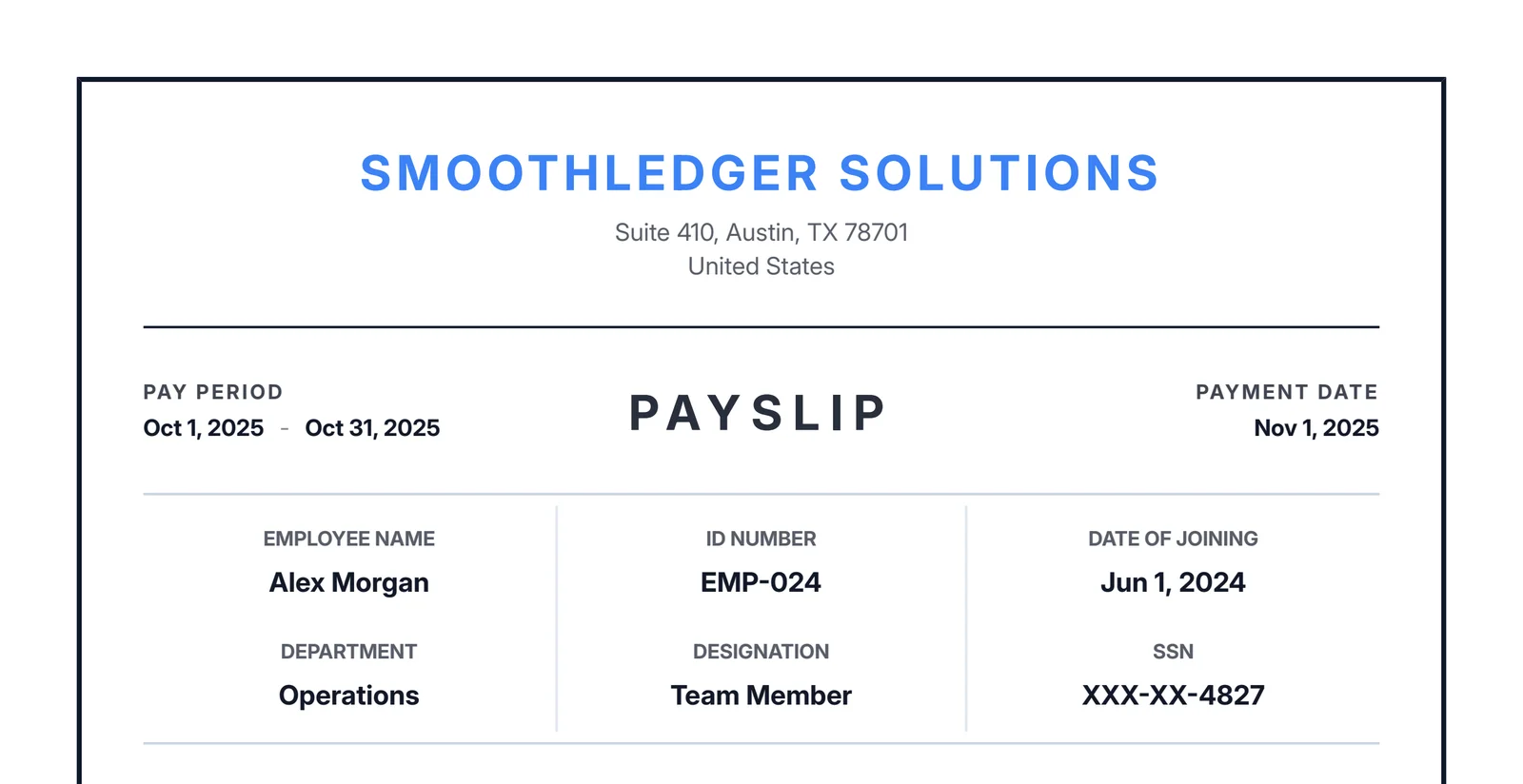
Your pay stub must clearly identify the company issuing the payment and the employee receiving it. This includes names, addresses, and vital identifiers like an Employee ID or Department.
Clear Pay Period & Dates
A compliant payslip specifies the exact Pay Period (e.g., Oct 1 - Oct 31) that the earnings cover, as well as the actual Pay Date the funds were disbursed.
Itemized Earnings & Deductions
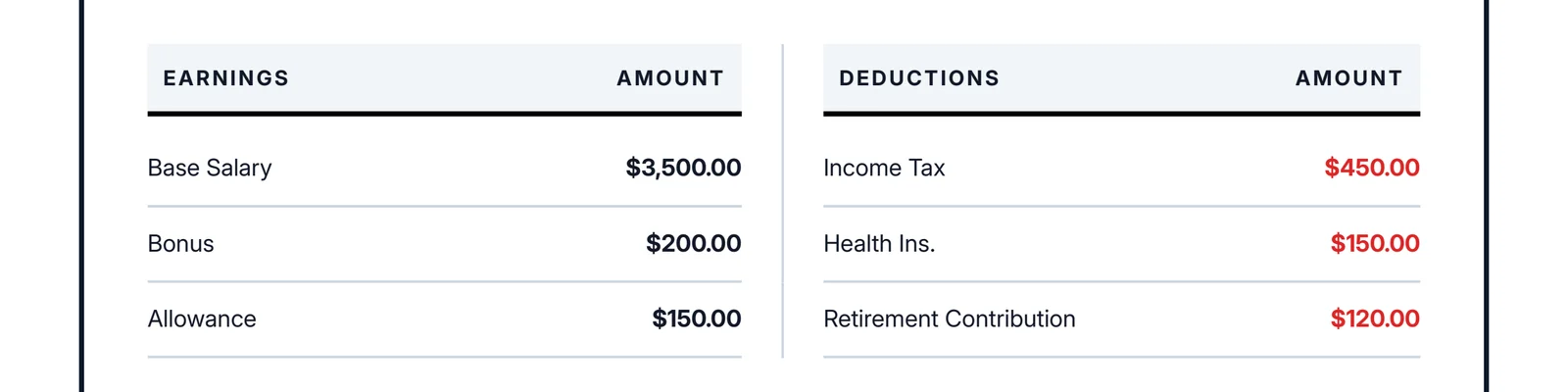
Transparency prevents disputes. A perfect salary slip clearly separates money earned from money withheld:
- Earnings: Base salary, hourly wages, overtime, commissions, or performance bonuses.
- Deductions: State/Federal income tax, health insurance, retirement contributions, or child support.
A Clear Breakdown of Totals
The bottom of your document should clearly summarize the math so it acts as valid proof of income. Our tool handles this automatically:
- Gross Pay: The total amount earned before any taxes are removed.
- Total Deductions: The sum of all withheld money.
The Net Pay (Take-Home)
This is the most important number on the page. The Net Pay represents the actual amount deposited into the employee's bank account.

Pay Stub & Payslip Generator FAQs
Everything you need to know about our free payslip generator, pay stub maker, and salary slip templates — from getting started to payroll best practices.
Is this payslip generator completely free to use?
What's the difference between a payslip generator, pay stub maker, and salary slip maker?
Do I need to sign up or create an account?
Do I need to enter a credit card?
Is my employee's salary and tax information safe, or is this payslip generator safe to use?
Is this a good pay stub generator for a single, one-off payslip?
Can I use this pay stub generator for proof of income?
Can I use this for contractors as well as full-time employees?
What's the difference between a 'payslip', 'pay stub', and 'salary slip'?
Are the automatic tax calculations accurate?
Can I add my own company logo to the salary slip?
Is the downloaded PDF printable?
Can I use this payslip generator on my phone?
What information should a payslip include?
Is providing a payslip a legal requirement?
Does this payslip generator track Year-to-Date (YTD) totals?
What's the difference between a payslip generator and payroll software?
Ready to run payroll faster?
Join thousands of small businesses and HR managers already using SmoothLedger's payslip generator to automate payroll and look professional.
More Free Tools From SmoothLedger
Payroll is only one piece of running your business. Quote the job, invoice it once it's done, and get paid — all in one place.
Free Payslip Templates Built for Every Business
Generate industry-ready payslips no matter what you do. Browse your profession below to start with a free payslip template built around how you pay your team.