
Free Quotation Generator & Estimate Maker
Win the job before you even start it. Build a professional quote online in minutes with our free quotation generator no login, no credit card required. Once it's approved, turn it into an invoice with one click.
Trusted by 10,000+ businesses.
What Is a Quotation Generator?
A free quotation generator is a web-based quote maker that turns your business and client details into a polished, ready-to-send PDF in minutes — no spreadsheet formulas, no design software, and nothing to install. Here's how it compares to an estimate maker and a plain quote template.
Quotation Generator
Enter your line items and SmoothLedger automatically calculates subtotals, tax, and the final total — then exports a finished, professional PDF in seconds.
- Auto-calculated totals
- Instant PDF export
- No manual math
Quote Maker & Estimate Maker
Different name, same idea — a quote maker (or estimate maker) just means a generator. Build once, then reuse your business and client details on every quote after that.
- Reusable client details
- Your logo and branding
- Works on any device
Quotation Template
A static layout you fill in and calculate by hand. SmoothLedger works this way too — clear the sample line items and use it as a free, printable quote template whenever you'd rather skip the automation.
- Free to download
- Print or fill by hand
- No login required
Everything You Need to
Close the Deal
Use our free online quotation generator to create and download professional quote PDFs. These tools help you track responses and close deals faster.
1-Click Quote-to-Invoice Conversion
Don't waste time typing the same line items twice. When a client approves your estimate, instantly flip it into a ready-to-pay invoice with a single click.
Send Quotes Directly
Skip the download folder. Once your quote or estimate is ready, email the finished PDF straight to your client from inside SmoothLedger — no separate email client required.
Saved Client CRM
Save client addresses, tax IDs, and default rates once, then auto-fill them into every new quote or estimate with a single click.
Real-Time Tracking
Know exactly where things stand. Get notified the moment your client opens or views a quote you've sent.
100% White-Label
Upload your own logo, set custom brand colors, and choose from premium quote templates so every estimate you send looks like it came from an in-house design team.
Ditch Manual Quotes in Word & Excel
Manually building each quote in Word or Excel costs you time, breaks your formatting, and makes you look less professional than businesses using a dedicated quotation generator. It's time for an upgrade.
The Old Way
- Proposal CreationManual typing and manual math in a Word or Excel quote template.
- Client ManagementSearching through folders to find old addresses.
- ProfessionalismGeneric, clunky templates that look copy-pasted.
- Quote TrackingGuessing if the client actually opened your estimate.
With SmoothLedger
- Proposal CreationAuto-calculated quotes from a free quotation generator, done in seconds.
- Client ManagementSecure cloud CRM — select a saved client in one click.
- ProfessionalismPremium quote templates, custom colors, and your brand logo.
- Quote TrackingReal-time read receipts and 1-click invoice conversions.
More Than Just a Generator.
A Complete Proposal Workspace.
SmoothLedger is built to be more than a one-off quotation generator — it's quoting software designed around your time, your privacy, and how your business actually grows.
Privacy-First by Design
Your data shouldn't be the price of using a free quotation generator. Start building your quote right in the browser, then move to secure cloud storage whenever your business is ready for it.
- Browser-based, nothing to install
- Start quoting before creating an account
- Secure cloud sync when you're ready
No Credit Card to Get Started
Create and download professional quotes without entering payment details. Our free quotation generator covers what a growing business needs day to day — upgrade to Pro only when you want unlimited documents, saved clients, and full white-label branding.
- No credit card on the free plan
- Everything you need to start quoting
- Upgrade only when you're ready to scale
Global Tax Readiness
Doing business internationally? Whether you're charging VAT in Europe, GST in Australia, or sales tax in the US, our quotation generator handles the math instantly — so every estimate you send is accurate from the start.
- Supports all major global currencies
- Custom tax naming (VAT, GST, State Tax)
- Apply flat-rate or % discounts
Built for Speed
Click download and your quote PDF is ready immediately — no queues, no waiting on an email link. Everything renders and saves straight to your device.
- Instant local browser generation
- High-resolution, print-ready PDF output
- Fully mobile responsive for quoting on-the-go
How to Create a Quote for Free (in 3 Steps)
Go from zero to a professional, downloaded quote PDF in under a minute — no signup required.
1. Fill in Your Quote Details
Add your business details, client information, and line items. Our quotation generator calculates totals, tax, and discounts automatically as you type.
2. Choose Your Quote Template
Upload your logo, choose a quote template, and adjust the colors and fonts to match your brand's style.
3. Download Your PDF Quote
Add your terms — like a "valid for 30 days" notice — then download a professional, high-resolution quote PDF, ready to email, print, or send to your client.
What Makes a Perfect Quote?
Every professional quote needs the same core elements, whether you build one by hand or use a free quotation generator like SmoothLedger. Here's exactly what to include — and how our estimate maker handles each part automatically.
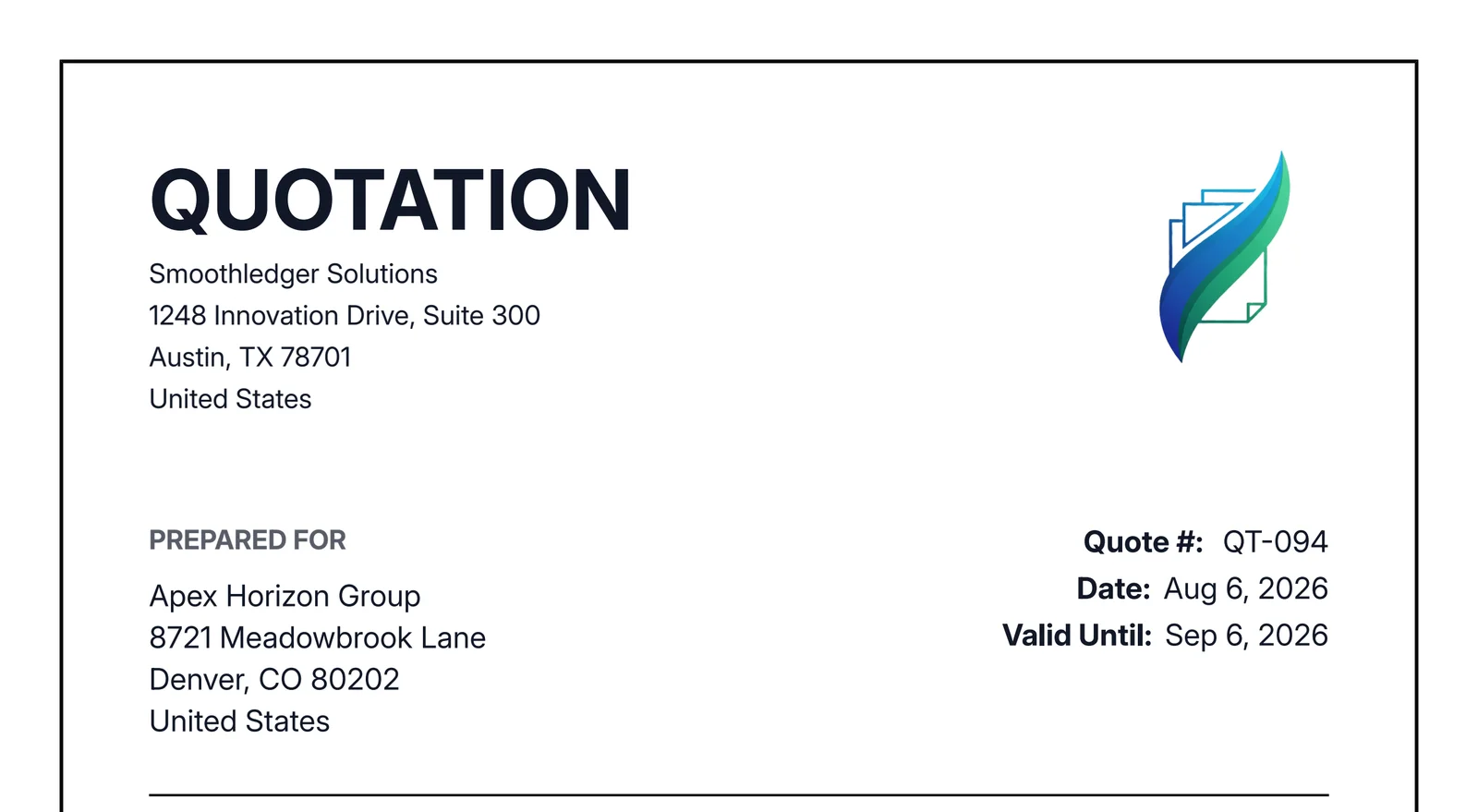
Clear "From" & "To" Information
Your proposal must clearly state who it's from (your business name, address, and contact info) and who it's for (your client's name and address).
Unique Quote Number & Validity
Every estimate needs a unique identifier, like Q-001. This is critical for tracking. You also must include the Date of Issue and a Valid Until date to protect against price changes.
An Itemized List of Services or Products
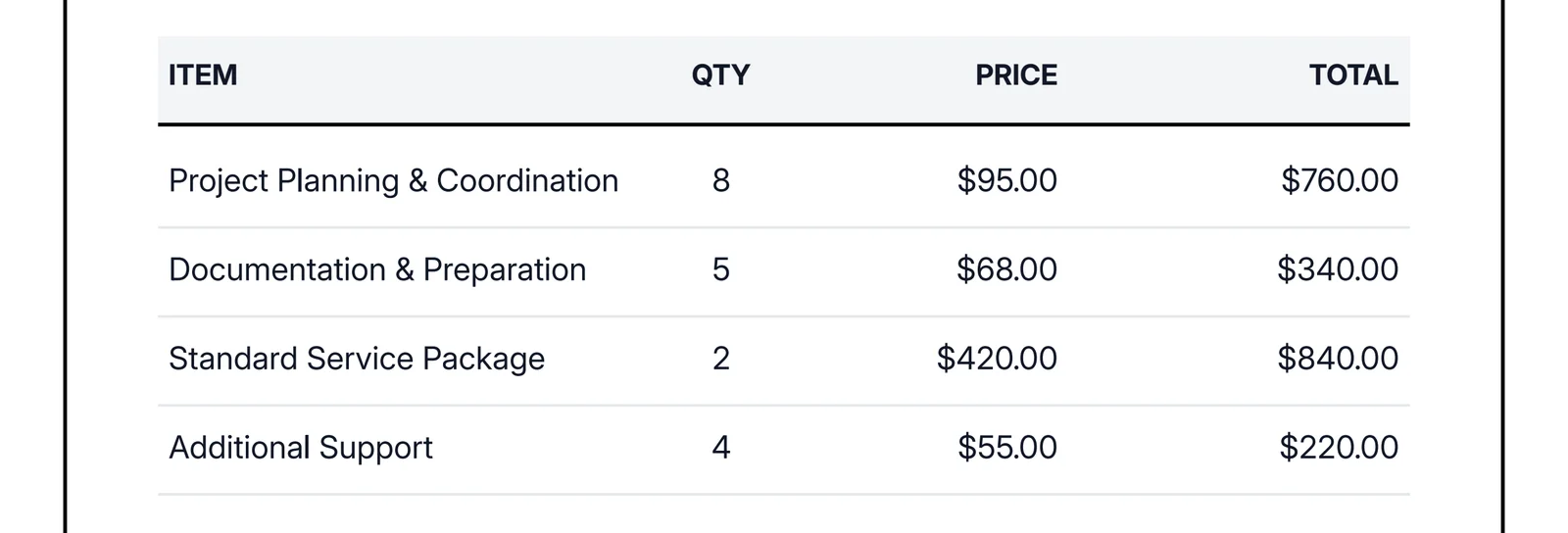
Break down your work into clear line items. Each item should have:
- A clear description (e.g., "Homepage Design Mockups")
- A quantity (e.g., "1" for a project, or "40" for hours)
- A rate (e.g., "$100" per hour)
- A final "Total" for that line.
This transparency builds trust and avoids client disputes.
A Clear Breakdown of Totals
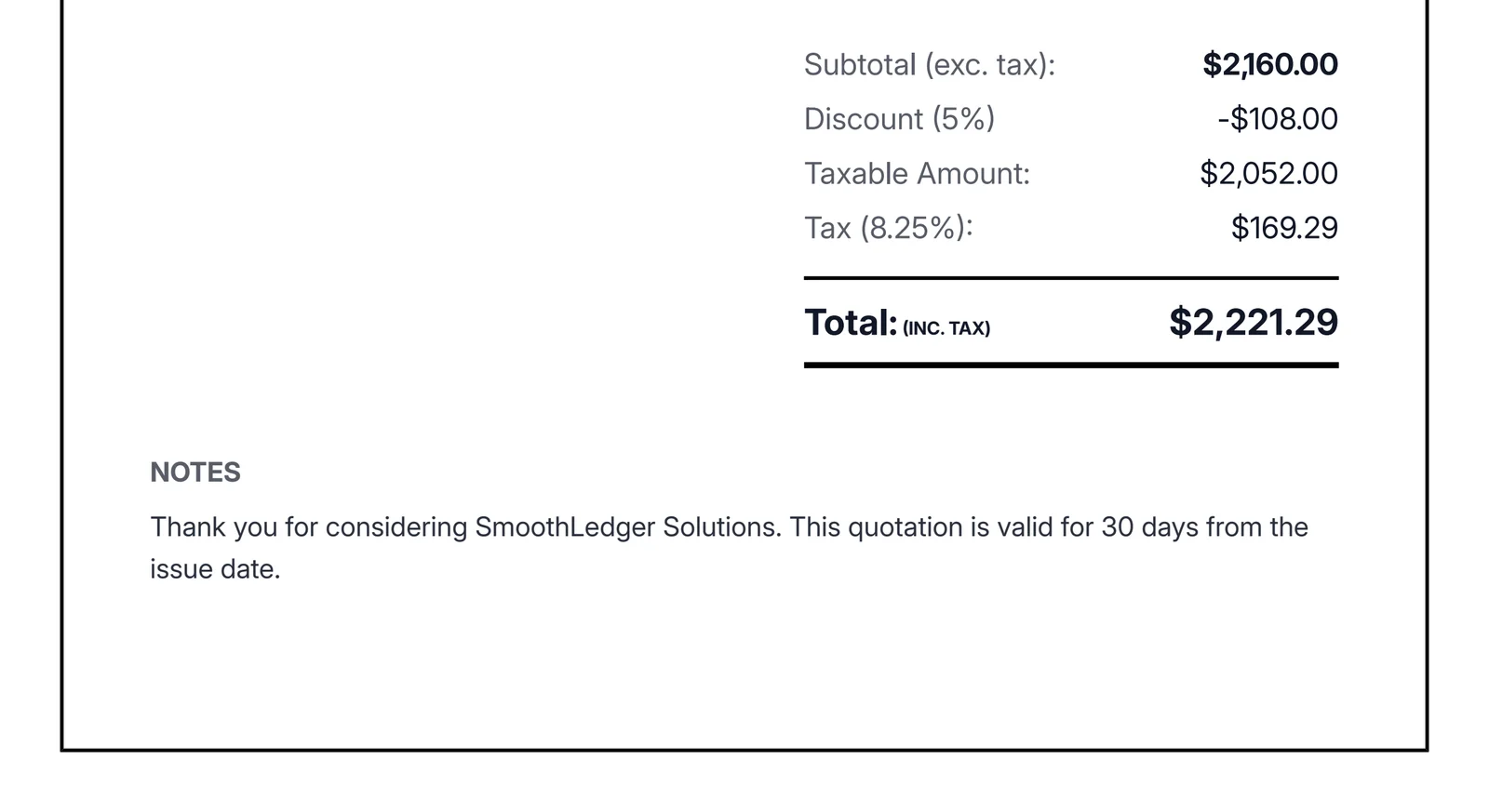
The bottom of your quote should clearly summarize all costs. Our tool handles this automatically:
- Subtotal: The total of all line items.
- Tax: Any tax (e.g., VAT, GST) added.
- Discounts: Any discounts you've applied.
- Grand Total: The final estimated amount, in bold.
Terms & Notes
The "Notes" section is where you seal the deal. Include your payment terms (e.g., "50% deposit required") and any specific project scope conditions.
Frequently Asked Questions
Everything you need to know about our free quotation generator, estimate maker, and quote templates — from getting started to quoting best practices.
Is this quotation generator really 100% free?
What's the difference between a quotation generator, quote maker, and estimate maker?
What is the difference between a Quote and an Estimate?
Do I need to create an account or sign up?
Do I need to enter a credit card?
Is my data saved on your servers, or is this quotation generator safe to use?
Is this a good estimate maker for a single, one-off job?
Can I use this as a construction estimate maker?
Can I convert a Quote into an Invoice later?
Can I add Terms and Conditions to my quote?
Can I add taxes (VAT, GST) and discounts?
Can I create a Proforma Invoice with this tool?
Can I change the currency symbol?
Is the PDF print-friendly?
Can I use this quotation generator on my phone?
What should a professional quote or estimate include?
How long should a quote stay valid?
Is a quote or estimate legally binding?
What's the difference between a quotation generator and quoting software?
Ready to win more jobs?
Join thousands of small businesses and contractors already using SmoothLedger's quotation generator to automate their estimates and look like a premium agency.
More Free Tools From SmoothLedger
Quoting is just the start. Send the estimate, invoice the approved job, and pay your team — all in one place.
Free Invoice Generator
Once a client approves your quote, build a professional invoice with our free invoice generator to get the job paid.
Create an invoiceFree Payslip Generator
Paying contractors or staff? Our free payslip generator (also called a salary slip generator) creates a clean, accurate payslip in the same time it takes to build a quote.
Create a payslipFree Quotation Templates Built for Every Business
Generate industry-ready quotes no matter what you do. Browse your profession below to start with a free quotation template built around how you price the job.